
Patients
Your first steps with our digital tools.


EkiYou®
Your doctor has prescribed EkiYou®, so here’s how to get started:
How to activate or renew a prescription?
Case 1: You received a code by email
If your prescription was issued through one of the compatible platforms, you will receive an email containing your personal access code. You will need to enter this code in EkiYou®.
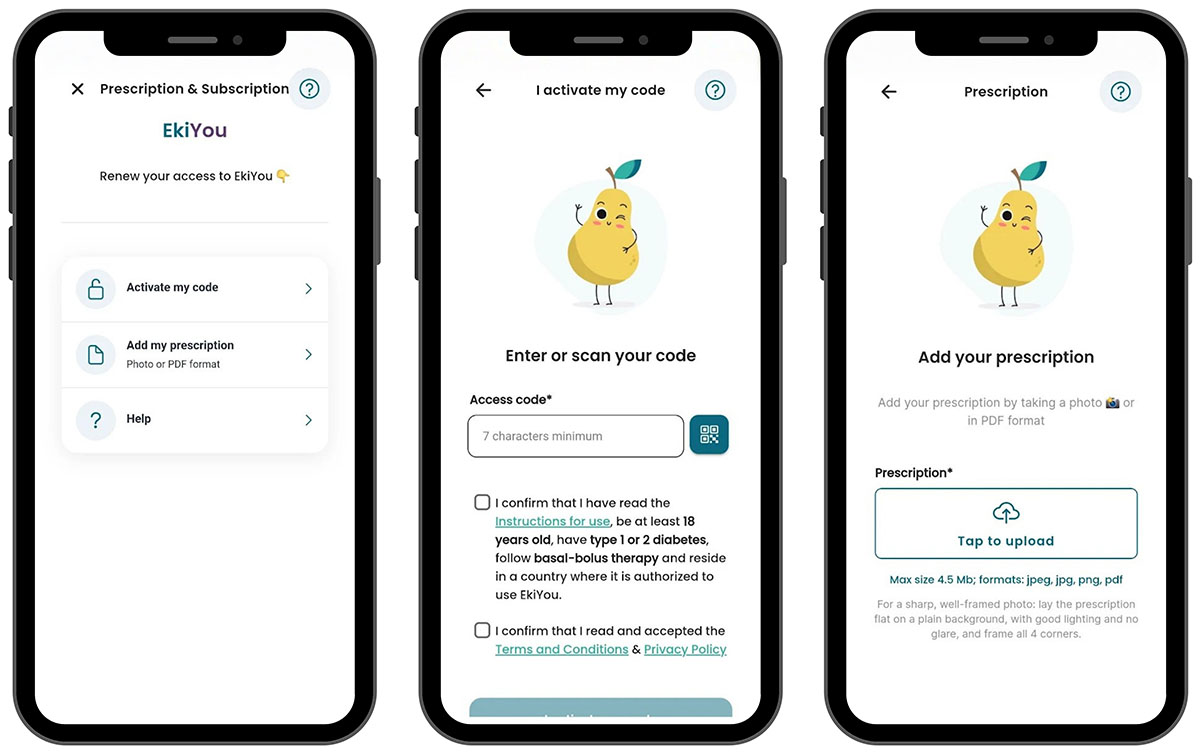
Case 2: You have a paper prescription
Add your prescription by taking a photo of it or uploading it as a PDF
Enter your social security number or scan it by clicking the green button
This prescription will need to go through a verification step. Once validated, you will receive an email and/or notification informing you that you can start using EkiYou® fully.
Questions? Need help? Feel free to contact our support team by email at ekiyou@diappymed.com or by phone at 04.11.93.88.06
How to set up your EkiYou® account?
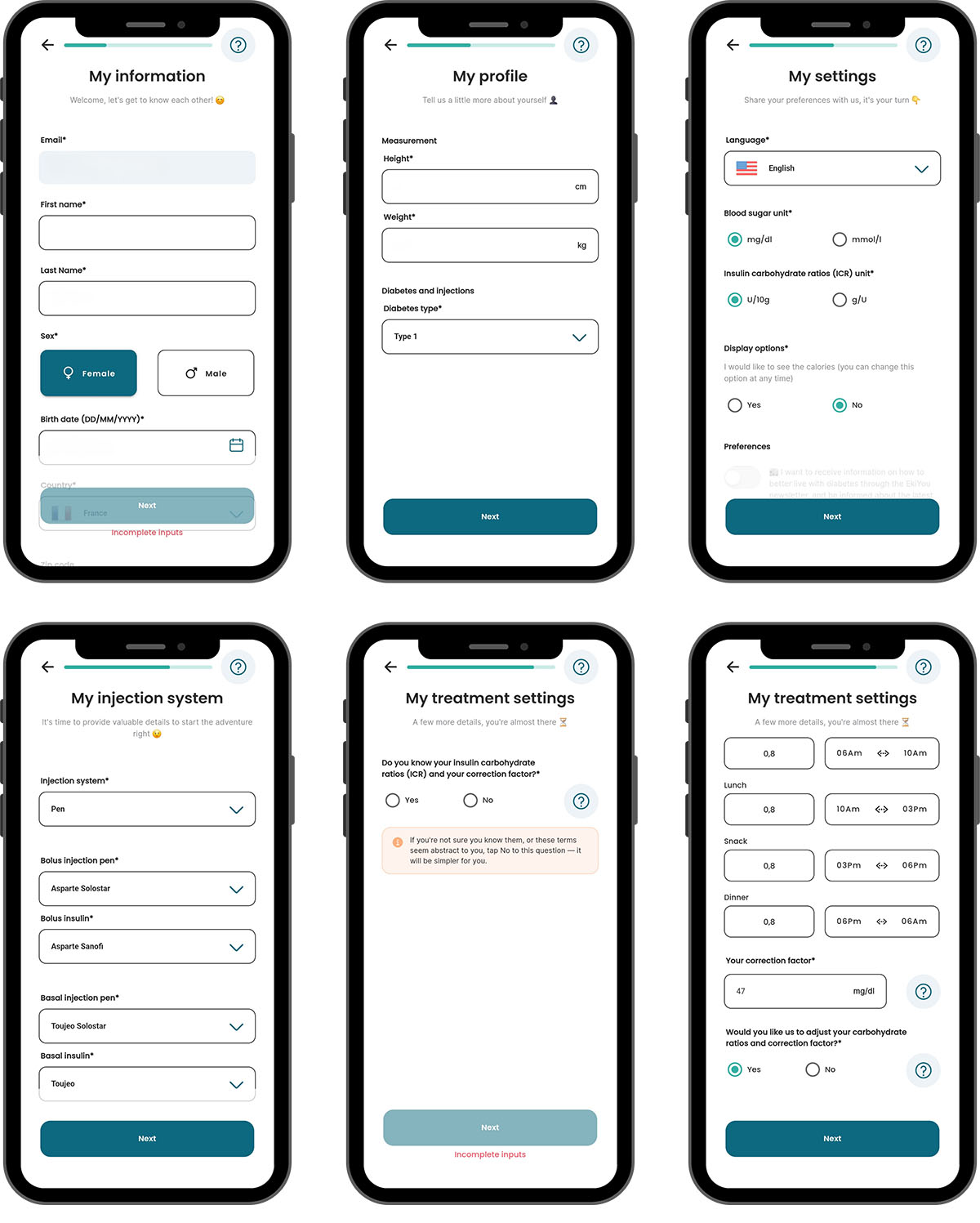
After creating your account and entering your prescription, you'll move on to setting up your account.
Read the "Getting Started" FAQ
Enter your personal information
Complete your profile
Enter your preferences
Enter your injection system
Set your treatment parameters • Two situations are possible:
Case A – You know your carbohydrate ratios and correction factor
Follow the on-screen instructions and enter your carbohydrate ratios and correction factor.
Case B – You don't know your carbohydrate ratios or correction factor
Enter your long-acting and rapid-acting insulin dose information. EkiYou® will automatically calculate your carbohydrate ratios and correction factor.
Automatic adjustments
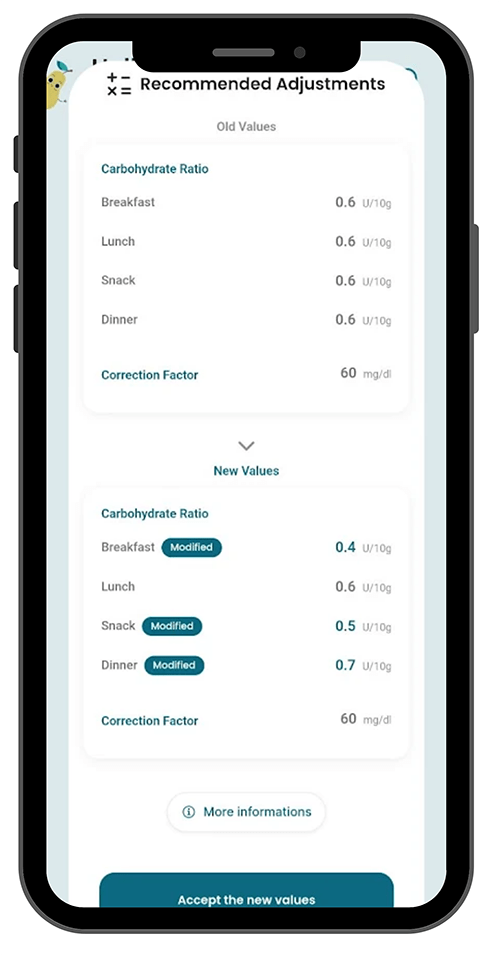
In both cases (A or B), EkiYou® can automatically adjust your long-acting insulin dose, carbohydrate ratios, and correction factor each week.
To activate this feature, simply answer the two questions asking whether you'd like to enable the adjustment algorithms during treatment parameter setup.
Once this option is activated, and provided you use EkiYou® regularly, you will receive a weekly notification, if necessary, suggesting adjustments to your basal insulin, carbohydrate ratios, and correction factor.
You are free to accept or decline these suggestions. Your change history is available at any time in your profile.
Your EkiYou® setup is complete!
Questions? Need help? Feel free to contact our support team by email at ekiyou@diappymed.com or by phone at 04.11.93.88.06
How to connect a glucose sensor (CGM) to EkiYou®?
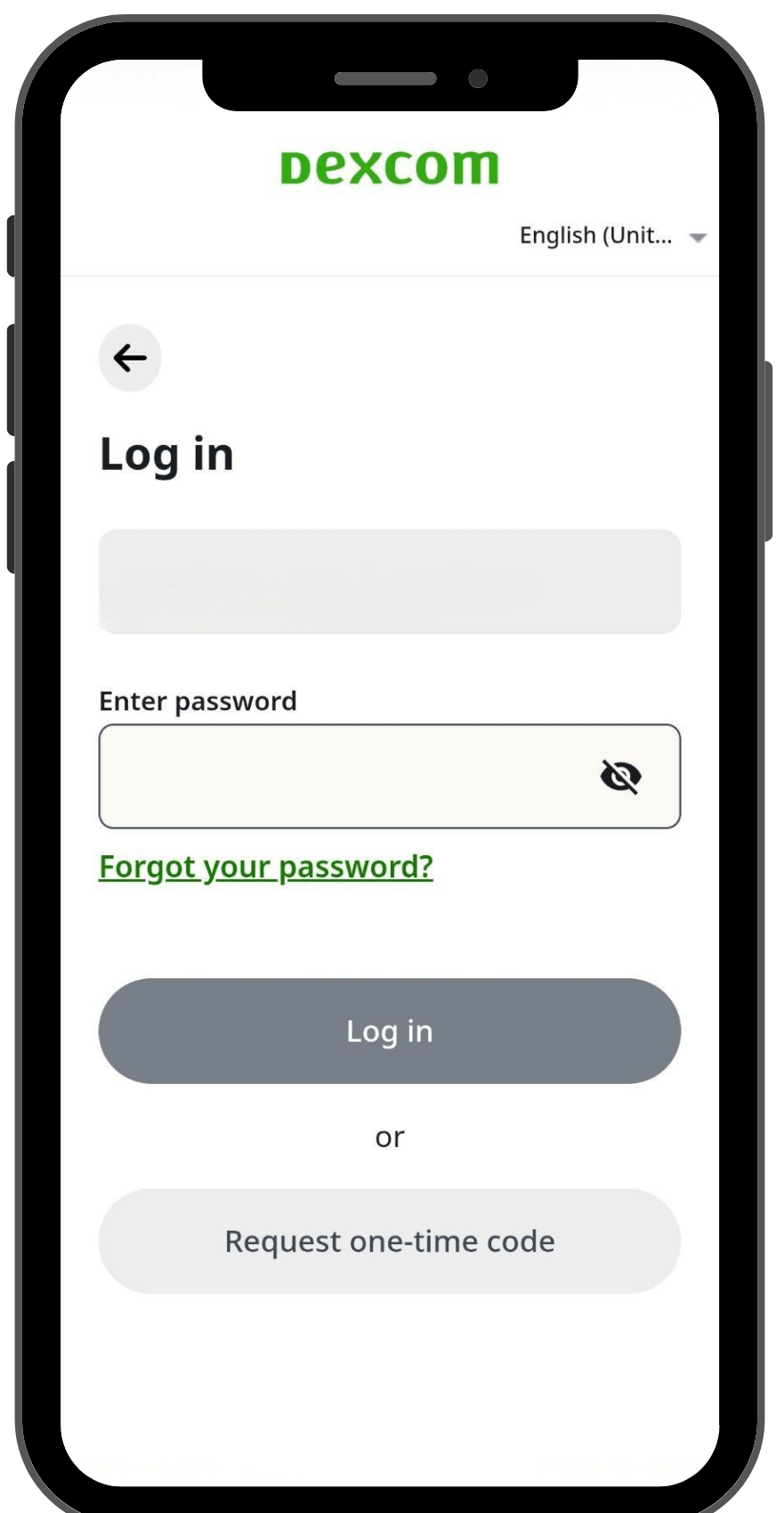
In "Account," click on "Devices," then click the (+) button.
Click on your CGM, then click "Yes."
Enter your username and password to log in to your CGM account.
Authorize the transfer of your data to EkiYou®
Your glucose sensor is now connected. EkiYou® will retrieve your glucose data with a delay.
Questions? Need help? Feel free to contact our support team by email at ekiyou@diappymed.com or by phone at 04.11.93.88.06
How to enable data sharing?
Questions? Need help? Feel free to contact our support team by email at ekiyou@diappymed.com or by phone at 04.11.93.88.06
How to calculate a meal bolus with EkiYou®?
On the home screen, click the (+) button
Click "Calculate bolus"
Click the (+) button to add your meal and enter the food item, or scan its barcode if it's a store-bought product. Select the appropriate food item from the list provided. You can also use the "My Meal Sizes (SML)*" feature
Enter the quantity consumed using the quantification assistant (this tool lets you choose the unit of measurement that suits you)
If needed, complete your meal by adding other food items, repeating the same steps as above
Enter a physical activity by following the on-screen instructions
Enter your blood glucose level. This will already be pre-filled if you recorded it a few minutes before the calculation
A summary will be displayed; check the entered data, and if everything is correct, click "Calculate insulin dose"
EkiYou® will suggest a bolus
*The "My Meal Sizes (SML)" feature offers a simplified alternative to carbohydrate counting. It allows you to log your meals using three categories (small, medium, or large meal), without entering each individual food item.
A tutorial is available within EkiYou® to guide you through the setup.
EkiYou® does not provide predefined values for these meal sizes. Since these reference portions are indicative, it is recommended that you define them with the help of a healthcare professional.
Questions? Need help? Feel free to contact our support team by email at ekiyou@diappymed.com or by phone at 04.11.93.88.06
How to calculate a correction bolus with EkiYou®?
On the home screen, click the (+) button.
Click "Add Blood Glucose".
Complete the requested information.
Case a: If EkiYou® detects hyperglycemia, a correction bolus will be suggested. Upon accepting it, a summary will be displayed showing your parameters and active insulin. Remember to add an injection if you forgot to enter one, otherwise click "Next." The previously entered blood glucose level will be displayed; click "Next," and a bolus dose will then be recommended.
Case b: If EkiYou® detects hypoglycemia, a sugar intake (resucrage) is recommended. Please consult your healthcare professional to determine the appropriate sugar intake for your situation.
Case c: EkiYou® estimates that your blood glucose is within target, taking into account your active insulin. No correction dose or sugar intake is suggested.
Questions? Need help? Feel free to contact our support team by email at ekiyou@diappymed.com or by phone at 04.11.93.88.06
How do the adjustment algorithms work?
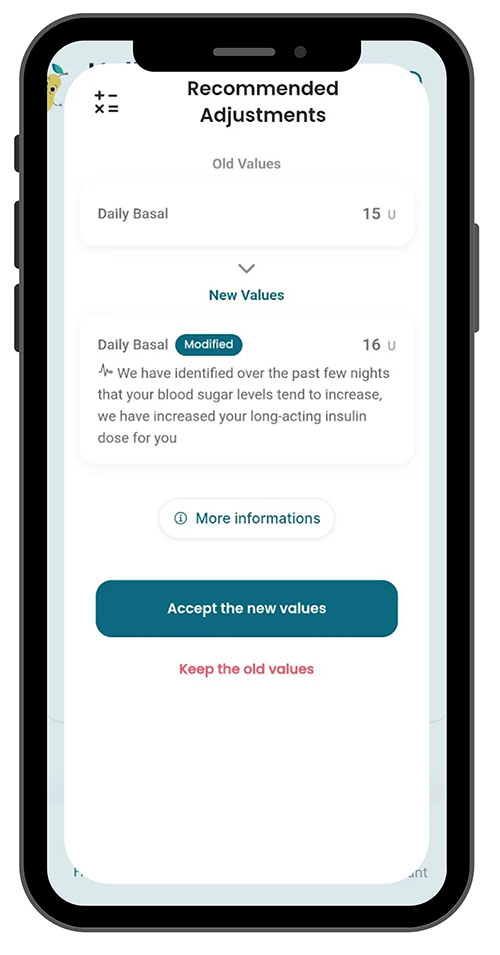
Automatic adjustment of long-acting insulin
If you use an insulin pen and a compatible glucose sensor/monitor (CGM), EkiYou® can suggest automatically adjusting your basal insulin dose.
To do this, the app analyzes your glucose data and recorded injections over the past 14 days. Based on how your blood glucose evolves overnight, EkiYou® may suggest increasing or decreasing your dose.
Each proposed change is flagged with a notification. You remain free to accept or decline it, and you can view your change history in your profile.
Automatic adjustment of carbohydrate ratios and correction factor
EkiYou® can automatically adjust your insulin-to-carb ratios and your correction factor based on your glucose data, meals, and injections recorded over the past 14 days.
To receive personalized recommendations, use EkiYou® regularly for your meal boluses and corrections. To avoid overly large changes, EkiYou® adjusts your settings gradually. Each change is flagged with a notification, and you remain free to accept or decline it. You can view your change history in your profile.
If your settings are unknown at the outset, a learning period of approximately three weeks is generally required. During this period, be sure to record the doses actually administered, especially when they differ from those suggested by EkiYou®. This information helps the algorithm better understand your needs and gradually improve its recommendations.
Note: The adjustment algorithms can be activated during EkiYou®'s initial setup. Otherwise, go to "Account" settings > My medical file > Basal Configuration and Bolus Configuration.
EkiYou usage information

EkiYou Carbs
You want to use EkiYou Carbs,
here’s how to get started:
How to enter a meal in EkiYou Carbs?
On the home screen, click on the (+) button.
Click on “Add meal”.
Enter your food or scan its barcode if it's a commercial product. Select the appropriate food from the list.
Enter the quantity consumed. Use the visual indicators to identify the quantity of food according to the size of your dish.
If a food or meal is eaten regularly, add it as a favorite to save time next time.
How to export your logbook from EkiYou Carbs?
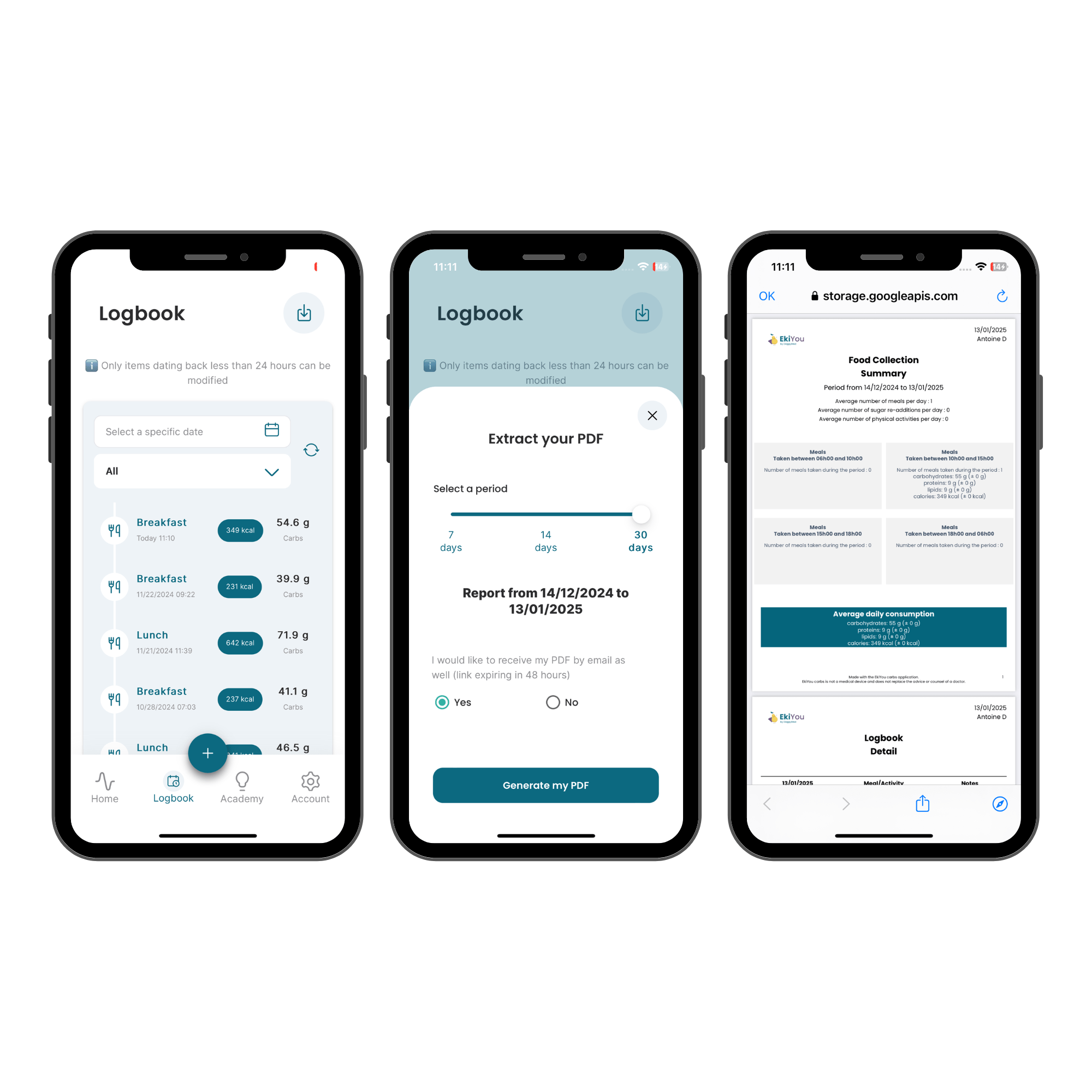
On the home screen, click on the “Logbook” button at the bottom.
To export the logbook as a PDF file, click on the button at top right.
EkiYou Carbs usage information
Data Processing
The data collected by DiappyMed is stored on certified health data servers (HDS) and processed in accordance with GDPR.
Disclaimer Clauses
*The data contained in the application, including macronutrient calculations, calorie counting, the food database, and articles published in the application, are provided for informational purposes only.
*The application is not intended to diagnose, treat, or advise the user on type 1 diabetes or any other medical condition. It is not intended to replace a medical consultation or treatment.
*For any medical questions or concerns, please contact your doctor or hospital/health center.
*The company does not provide a medical device or medical services through the application in question. The use of the application does not create a medical relationship between the company and the user.
Legal Notices
EkiYou is an application for adults with diabetes under a basal-bolus insulin regimen. It calculates meal bolus recommendations based on glycemia, carbohydrate intake, physical activity and individual insulin parameters. It may also propose adjustment recommendations for basal insulin dose, insulin-to-carbohydrate ratios and correction factor, when the feature is activated and sufficient data are available.
EkiYou provides decision-support recommendations only; it does not deliver insulin and does not control insulin pumps or automated insulin delivery systems. The user must review, confirm or adjust any recommendation before use.
EkiYou is a CE-marked Class IIb medical device under Regulation (EU) 2017/745. Notified body: CE 1912.
Use of EkiYou may expose the patient to risks of hypoglycemia and/or hyperglycemia in the event of incorrect entry of the data required for insulin calculation.
EkiYou does not replace medical advice. Please carefully read the instructions for use before using EkiYou and for full information on risks and precautions.
EkiYou version 2.1.1 (09/10/2026).
Manufacturer: DiappyMed. Instructions for use: https://diappymed.com/en/ekiyou001ifu-en/.
EkiYou Carbs is not a medical device and does not replace medical advice.
This application is not intended to diagnose, treat, or counsel the user about any pathology and provides only information’s.